Techgitz : Android Techgitz : Android

Pages

Ads


THIS AD SPACE FOR SALE!!!!! CLICK TO REEQUEST SPACE


Showing posts with label Android. Show all posts

Tuesday, 2 January 2018

How to Recover deleted Image/Video from Android Internal storage without Root

Did you delete any Picture or Video from your device Accidentally.
Don't get worried about recovering them.
This post will guide you to recover your deleted files on your Android.

Things you will need
- PC
- JIHOSOFT ANDROID PHONE RECOVERY Software ( You need to search and Download it on Google)
- USB Cable
- Android Device you want to recover the files from.

STEP 1: DOWNLOAD AND INSTALL JIHOSOFT
ANDROID PHONE RECOVERY AT YOUR COMPUTER.
You could download the Windows version at:
Android Recovery , download Mac version at:
Android Recovery for Mac . After download, you will
be lead to install the app at your computer.

STEP 2: SELECT DATA GENRE THAT YOU NEED TO
SCAN
After installation, run the app at your PC. You will
see the interface show you four options:
“Mul”, “Database”, “WhatsApp”, “All”. Tap
One of it according to your own demand.

STEP 3: IDENTIFY ANDROID PHONE OR TABLET WITH THE
COMPUTER.
First, connect your android device to computer via
USB cable. Then, turn on USB debugging at android
equipment.
If the app failed to identify your equipment, install
related USB driver at your computer.

STEP 4: SCAN ANDROID DEVICE AND EXPECT THE
RESULT
After identification, click "Start" for scanning. Please
be patient about the process.

STEP 5: PREVIEW DATA THAT LISTED ON THE
RESULT.
You will be able to review all the details of desired
data.

STEP 6: RECOVER DATA FROM ANDROID WITHOUT
ROOT.
Mark those data that you want, then tap “Recover”
to fulfill android data recovery without root.

Thursday, 14 December 2017

Samsung Galaxy S8/S8+gotten Oroe Beta 4 Update


Samsung has begun rolling out the Oroe Beta 4 on the Galaxy S8/S8+ Devices.
The Software update size is about 850mb as seen below and is available on Software version ZQL8 for both devices.


The update brings better improvements to Bluetooth Stability as well as Bug fixes.


Image credit: GSMArena

Wednesday, 29 November 2017

DOWNLOAD GB INSTAGRAM V1. 20. HERE. GB MODS latest project.


With the latest release of GB WhatsApp.
GB MODS Have finally released their latest project. GB Instagram. The app has finally been completed and released for download. The app comes with awesome features.

FEATURES OF GB INSTAGRAM AND GB INSTAGRAM+

* Ability to download pictures and videos
* You can upload photos and videos from Alsturi
* Possibility preview images and play videos your operator without saving device
* the ability to share / copy images links and videos
* add many options to change Theme (colors) conversations screen and conversations
* You can copy comments
* you can translate comments into your own language
* you can work zoom (zoom in / out) for photos and personal photos publications through prolonged by pressing
* click on the links in the program are fully supported (publications-comments-in conversation)
* add the option to play audio with the video automatic
* can Copy Descriptions
* You can find out who follows (Enter the person 's file for any person you will find the word that follows it follows)

Download the Gb Instagram here


Download the Gb Instagram+ here

Friday, 24 November 2017

How to Port Nougat Roms 3.18.35 [ TUTORIAL ]


THINGS YOU NEED;

1.NOTEPAD++

2.WINRAR,7ZIP OR ANY FILE EXTRACTOR

3.BOOT.IMG EXTRACTOR (I USE MTKBOOTIMG TOOL) LIKE CARLIV

4.LITTLE OF BRAIN(DONT BE LAZY IF DONT KNOW SOMETHING GOOGLE IT)

5.STOCK ROM(OR ANY STABLE ROM)

6 PORT ROM (ROM WHAT YOU WANT TO PORT)

LETS START:

1.copy kernel from stock (or any stable rom ) boot to port boot.img.repack it.

2.from stock system/bin copy vold and paste/replace in port system/bin;

3.from stock system/vendor copy firmware and paste in port system/vendor first delete port firmware.

4.from stock system/vendor/lib/hw copy hw.mt6580 composer.so and paste/replace to port system/vendor/lib/hw;

5.from stock/vendor/lib folder copy; lib.camalgo,lib.cameradrv,lib.cameracustom and paste/replace to port/system/vendor/lib;

6.from stock system/usr copy and replace generic.kl and thats it.

Note: in some ocassion when some keys dont work replace five(5) files with generic.kl included.

7.make a zip with winrar or 7zip and flash trough custom recovery.

NOTE; WITH THIS SIMPLE GUIDE ROM WILL BOOT. IF YOU FIND ANY BUGS FOR FIX USE STOCK VENDOR BLOBS.

NOTE2;PLEASE DONT ASK ME STUPID QUESTION ABOUT THIS.IT IS SO SIMPLE THAT ANYBODY CAN UNDERSTAND THIS GUIDE.

NOTE 3.; PLEASE WATCH MOUNTPOINT OF META-INF UPDATER SCRIPT .IF YOU DONT KNOW WHAT IS YOUR DEVICE MOUNTPOINT USE DISK INFO.APK FOR KNOWING THAT.OTHERWISE USE ANY OTHER UPDATER SCRIPT TO COMPARE MOUNTPOINT.

NOTE4.; FOR EXAMPLE MOUNTPOINT OF MOST MT6580 NOUGAT DEVICES IS HAVE THIS LINE AND THIS LINE IS COMMON ON MANY CASES:mount("ext4", "EMMC", "/dev/block/platform/mtk-msdc.0/11120000.msdc0/by-name/system", "/system"); AND THIS LINE ;package_extract_file("boot.img", "/dev/block/platform/mtk-msdc.0/11120000.msdc0/by-name/boot");. ON OTHER CASES HAVE OTHER LINES LIKE FORMAT,MOUNT,WITH SAME LINES,SO BE CAREFULL.

Credit: RUDI KOVAC

PORTING GUIDE FOR LOLLIPOP DEVICES. 3.10.XX


THINGS YOU NEED;

1.NOTEPAD++

2.WINRAR,7ZIP OR ANY FILE EXTRACTOR

3.BOOT.IMG EXTRACTOR (I USE MTKBOOTIMG TOOL) LIKE CARLIV

4.LITTLE OF BRAIN(DONT BE LAZY IF DONT KNOW SOMETHING GOOGLE IT)

5.STOCK ROM LP (OR ANY STABLE ROM)

6 PORT ROM LP (ROM WHAT YOU WANT TO PORT)


LETS START: 1.copy kernel from stock (or any stable rom ) boot to port boot.img.repack it.

2.copy ueventd from stock boot.img initrd folder to port boot.img initrd

3.from stock system/bin copy pq,vold and paste/replace in port system/bin;

4.from stock system/etc copy firmware,mddb,wifi,bluetooth folders and paste in port system/etc first delete port firmware,mddb,wifi,bluetooth.

5.from stock system/lib/hw copy complete folder and paste/replace to port system/lib.

6.from stock system/lib copy soundfx and module if exist(if dont skip)

7.from stock/lib folder copy; audio.primarydefault.so, lib.camalgo,lib.cameradrv,lib.cameracustom and paste/replace to port/system/lib;

8.from stock system/usr copy and replace generic.kl and thats it.

9.from stock system/vendor copy lib folder and replace in port system/vendor folder.

10.make a zip with winrar or 7zip and flash trough custom recovery.

NOTE; WITH THIS SIMPLE GUIDE ROM WILL BOOT. IF YOU FIND ANY BUGS FOR FIX USE STOCK VENDOR BLOBS.

NOTE2;PLEASE DONT ASK ME STUPID QUESTION ABOUT THIS.IT IS SO SIMPLE THAT ANYBODY CAN UNDERSTAND THIS GUIDE.

NOTE 3.; PLEASE WATCH MOUNTPOINT OF META-INF UPDATER SCRIPT .IF YOU DONT KNOW WHAT IS YOUR DEVICE MOUNTPOINT USE DISK INFO.APK FOR KNOWING THAT.OTHERWISE USE ANY OTHER UPDATER SCRIPT TO COMPARE MOUNTPOINT.

NOTE4.; FOR EXAMPLE MOUNTPOINT OF MOST MT6580 MM DEVICES(FOR LOLLIPOP I AM NOT SURE) IS SYSTEM 18,DATA 20,BOOT.IMG 7,LOGO 10,ALSO IN SOME ROMS CAN HAVE THIS LINE AND THIS LINE IS COMMON ON MANY CASES:mount("ext4", "EMMC", "/dev/block/platform/mtk-msdc.0/11120000.msdc0/by-name/system", "/system"); AND THIS LINE ;package_extract_file("boot.img", "/dev/block/platform/mtk-msdc.0/11120000.msdc0/by-name/boot");. ON OTHER CASES HAVE OTHER LINES LIKE FORMAT,MOUNT,WITH SAME LINES,SO BE CAREFULL.

NOTE5; REMEMBER ONE THING.IT IS EASIER TO SAY I “DONT KNOW SOMETHING” THEN MAKE YOURSELF SMARTER THEN YOU THINK YOU ARE.WE ARE HERE TO HELP YOU.


CREDIT : RUDI KOVAC

Thursday, 9 November 2017

How to fix Unknown Baseband on any Custom Rom

I want to show you how you can fix on any Custom Rom. This guide is very important for you because you need to follow this guide before you venture into flashing a Custom Rom on your Android device.

*Let's Begin

Before flashing any Custom Rom it is always advisable to have the backup of your Stock Rom in case any thing goes wrong.

There are always cases of having Unknown Baseband after flashing some Custom Roms on your Android device.

Example below


So to fix this we are going to need root explorer app.
♦ You can download ES File Explorer from Google Play Store.
♦ After that you will open the app.
♦ Click the 3 dot by the left side to open the menu.
♦ Scroll and Check Root Explorer. You must be rooted to use this function.


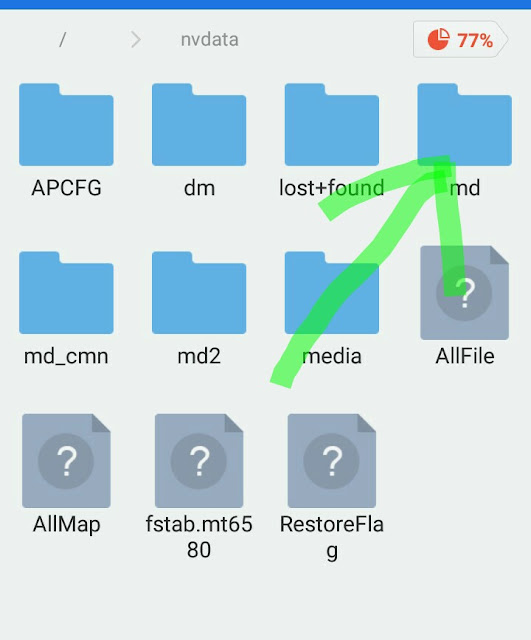
♦ Now you have granted root. Go-to your file location and click on the slash [ / ] to get to the root directory.


♦ You will see a window like the one in the picture below. Click on the
nvdata file


♦ Now Click on the
md file


♦ Click the
NVRAM File


♦ Copy the
NVD_IMEI** File


Paste the file to a SD Card. Where you can easily access it when you need it.

Now when you flash the Custom Rom and get Unknown Baseband. Replace the Nvd_imei file with the one you copied to your SD Card.

Reboot once done. You will get your signal bar running again.

Like this


Thanks for reading and Kindly Share if you find this Helpful.

Sunday, 29 October 2017

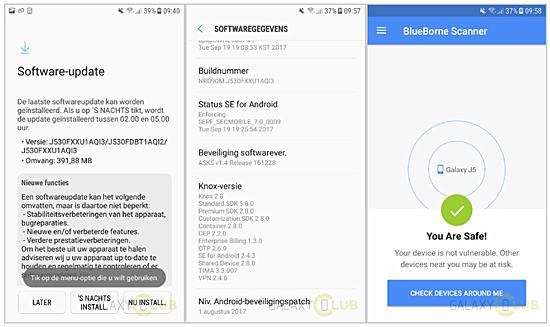
Samsung Galaxy S7 2017 Latest update brings BlueBorne Fix

Samsung has started rolling out an update to their Galaxy J7 (2017) Smartphone. Available in Europe, The size of the update is 392MB, devices with version J530FXXU1AQI3, and comes with BlueBorne Fix.


For those who don't have an idea of the vulnerability, it enables remote hacker to have control of your smart phone via Bluetooth.
What's more disturbing is the fact that the device hacked doesn't need to be paired or made discoverable.

Therefore is update is very important to the smartphone. It also comes with security patch for the month of August.
The update also includes usual improvement, fixes and optimizations.

 Source|

Thursday, 11 August 2016

Galaxy Note 7 with 6GB of RAM is real, but you can’t have it


Samsung just confirmed that the Galaxy Note 7 we kept seeing in leaks from China — the one that has 6GB of RAM, 128GB of storage, and the one you probably wanted to buy – is indeed real. It’s probably spectacular too. But, sadly, you can’t have one.


This version of the Galaxy Note 7 – shall we call it the Pro? – was spotted a few days ago in the regulatory documentation that Samsung filed with the Chinese government. Then, news broke out that the special edition phone would have an insanely high price tag .
Now, Samsung Mobile’s chief Koh Dong-jin finally confirmed the phone will launch in China while speaking at the Galaxy Note 7’s launch event in Seoul.

“It is true that we are reviewing the rollout of a new tablet with 128-gigabyte built-in memory in China because Chinese companies are aggressively doing marketing with high-capacity memory,” Koh said told reporters, according to The Korea Herald .

All hope is not lost, though. You might not have to book a flight to China to get your hands on this Android device just yet.

“We will accept diverse opinions from various regions and also consider whether that move will disappoint Korean consumers,” he added, suggesting that Samsung might consider launching the device in other markets in addition to China. However, an actual launch date for this Pro version of the Galaxy Note 7 has not been provided.

If that doesn’t happen, you can still go for the OnePlus 3 which also packs 6GB of RAM, but has a more reasonable price.

On the other hand, 6GB of RAM on a phone is probably overkill at this point. OnePlus throttled the RAM on the OnePlus 3 to conserve battery life, which meant that both the Galaxy S7 (4GB of RAM) and the iPhone 6s (2GB of RAM) managed to beat the phone in real-life performance tests. Only after OnePlus updated the phone’s RAM management was the OnePlus 3 able to unleash the power of all that extra RAM.